Your local container manager.
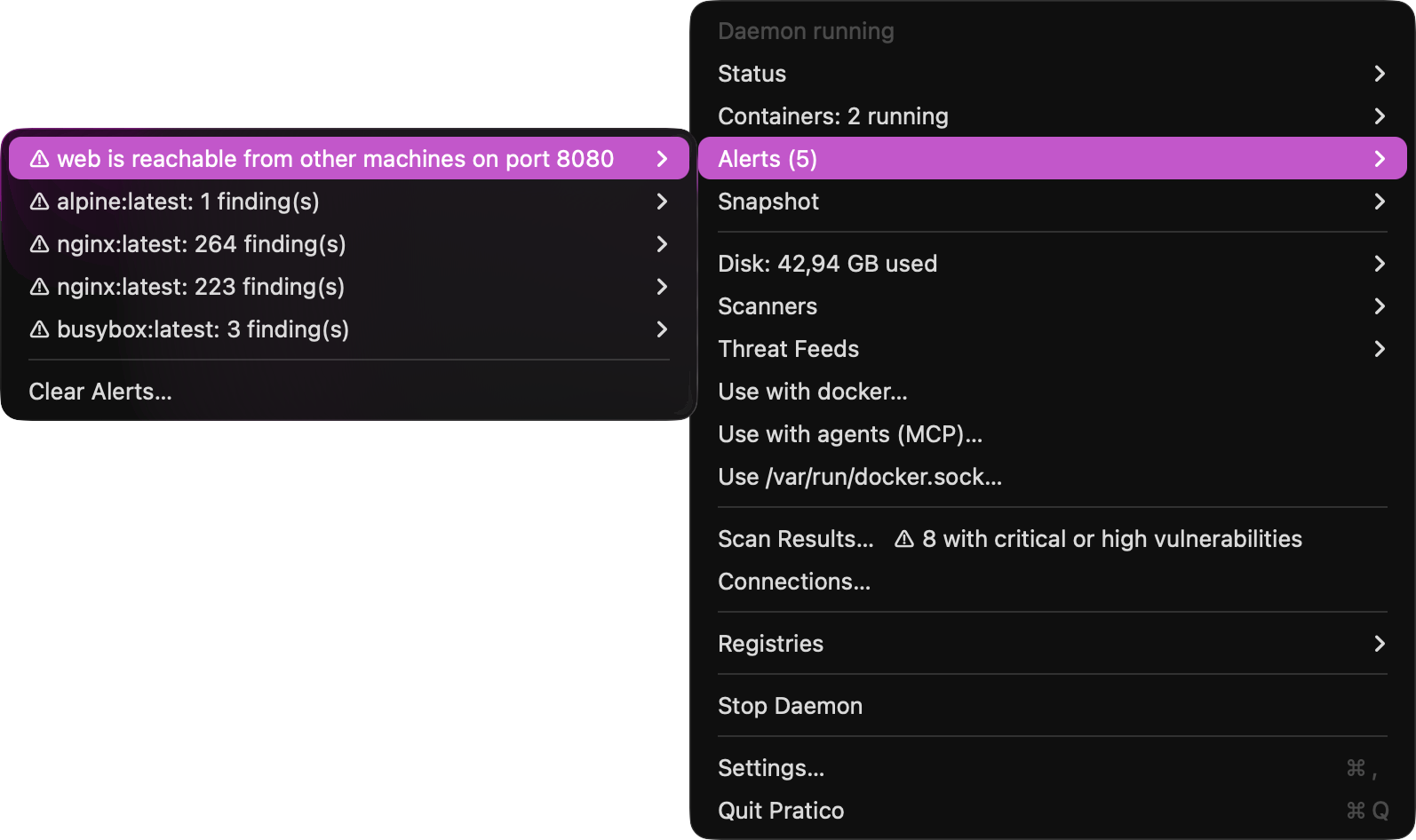
Pratico runs containers on your Mac with the tools you already have, and gives you a new way to work: every workload isolated in its own virtual machine, every image scanned the moment it arrives.
Apple silicon · macOS 26 · Free and open source (MIT)
Compatible
Keep your tools
Docker-compatible clients, OCI images from any registry, and images you move to and from Apple's container.
Isolated
One VM per workload
Each container gets its own kernel, its own memory, and its own network card. What happens in one stays there.
Protected
Scanned on arrival
Open source scanners check each image and the dependencies inside it as you pull it, long before a build or CI would.
One VM per workload
Real isolation, at the cost of a container
A shared VM looks lighter on paper, but it runs all day whether you use it or not, and every container in it shares one kernel. Pratico starts a small VM only for what you run, in well under a second, and gives everything back when it stops.
- Start a container
- ≈ 240 ms
- With nothing running
- 0 VMs
- Memory per idle container
- ≈ 320 MB
- Daemon, 16 containers running
- 31 MB
Pay only for what runs
No background VM holding gigabytes while you work on something else. Stop a container and its VM ends, with all of its memory back on your Mac.
One workload cannot reach another
No shared kernel, no shared process table, no files in common unless you share a volume. A crash, a runaway process, or a breakout stays in its own VM.
Limits the hypervisor enforces
Memory and CPU limits are the size of each VM, set by macOS, not settings inside a kernel every container shares. docker update tightens or loosens them while the container runs, up to the size its VM booted with.
Fast where you feel it
CPU runs natively on Apple silicon, each root file system is its own disk image, and control calls answer in under 3 ms with 100 containers.
A VM you can rebuild
The guest kernel and init are built by Pratico from pinned sources, and two builds give the same bytes, so the ones in the app can be checked against the source.
Syscalls filtered, as on Docker
Every container runs Docker's default seccomp profile, or yours, compiled by Pratico and installed inside its VM.
A record of what ran
Every program a container starts, with its arguments, every exit, and which process opened each connection and the host it reached, recorded inside its VM and kept after it stops. Each program is marked when it did not come with the image: downloaded, built, or changed in the container.
Compatible
Your tools, OCI images, and Apple container
Pratico speaks the Docker-compatible API on a socket in your home folder, runs standard OCI images from any registry, and is built on Apple's open source containerization framework, the same foundation as Apple's container tool.
# From Apple's container to pratico
$ container image save myapp:dev -o myapp.tar
$ docker load -i myapp.tar
$ docker run --rm myapp:dev

# And back
$ docker save myapp:dev -o myapp.tar
$ container image load -i myapp.tar
$ container run --rm myapp:dev
Side by side with Apple container
Both run on the same Mac at the same time, each with its own image store. Move images between them as OCI archives, both ways.
Clients you already use
Command-line clients and Compose files that speak the Docker-compatible API work unchanged, from version 25 on: run, exec -it, logs -f, build (BuildKit in its own VM), buildpacks' pack build, save, load, commit, diff, export, and cp with running or stopped containers. Options you pass are applied, from restart policies and CPU limits to capabilities; one a VM cannot honor is refused with a clear error, never ignored.
OCI images, any registry
Pull and push standard OCI images, with your registry logins and private certificate authorities.
Your test and dev stacks
Testcontainers and Compose stacks run as they do on Linux: postgres, mysql, redis, and mongo on their default volumes, which are real Linux disks, and test frameworks that mount the API socket reach pratico.
Each workload in its own VM
Networking that stays outside the workload
Every VM gets one virtual network card, plugged into pratico-net: a switch that runs on your Mac, outside every container. Each network a container joins is another address on that card, with its own MAC as the network sees it, and no limit on how many. The switch decides what each address may reach, and the rules live there, where no container can change them.
Networks that really separate
Containers on different networks cannot exchange a single packet. Compose projects get their own private networks, and an internal network never routes out, whatever runs inside.
Names, not addresses
Each network answers DNS for its containers and aliases, and passes other names to your Mac's resolver.
Ports you can see
Published ports are opened on your Mac by pratico. The menubar warns when one is reachable from your network, not only from this Mac.
Disconnect means disconnected
Taking a running container off a network cuts that address at the switch. Nothing inside the VM can bring it back.
Every connection, and who made it
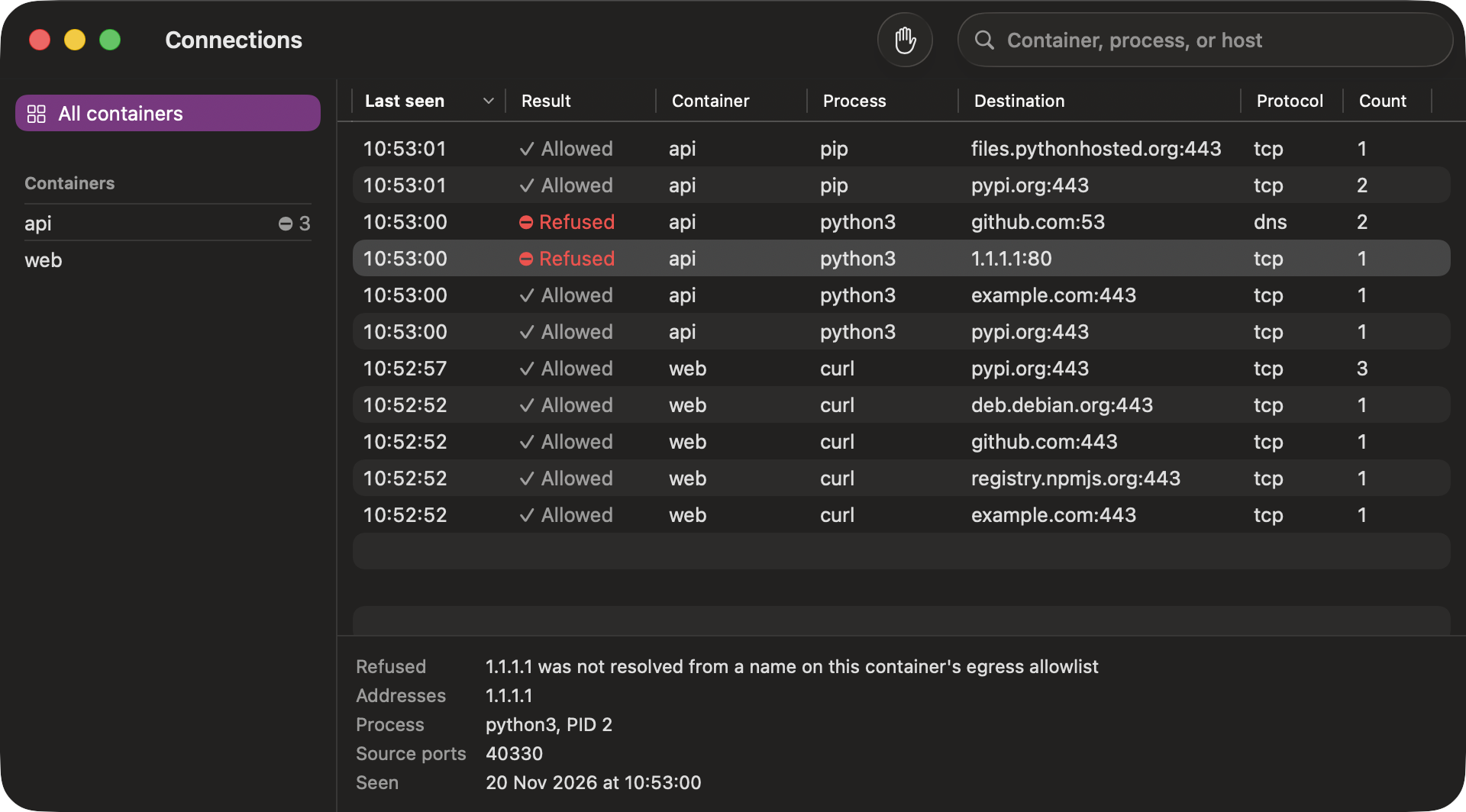
The Connections window lists where each container connected, the process inside it that opened each connection, and what pratico refused and why.
Security in the AI era
Don't wait for the build or CI to scan
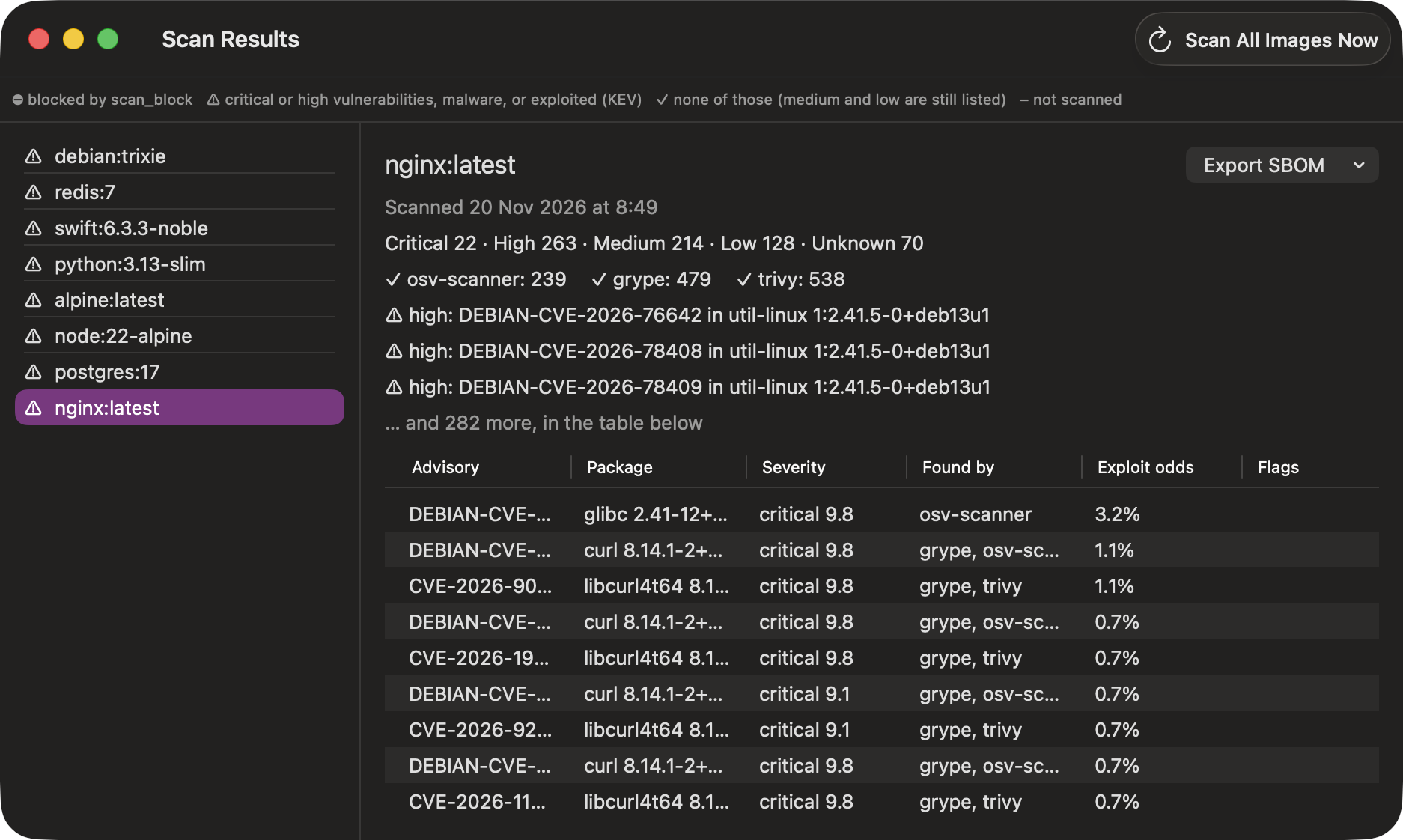
Agents, scripts, and copied commands pull and run images in seconds. Pratico scans each image, and the dependencies inside it, the moment it reaches your Mac, then again every day as new flaws are published. Malware and actively exploited flaws are stopped before they run. Containers' connections are checked too: botnet servers, malware hosts, and hijacked networks from abuse.ch and Spamhaus are refused, on your Mac, outside the container's reach.
-
osv-scanner
Google · Apache 2.0
Checks system and language packages against OSV.dev, the open vulnerability database, malicious package reports included.
-
grype
Anchore · Apache 2.0
Matches the image's packages against its own vulnerability database, downloaded to your Mac.
-
trivy
Aqua Security · Apache 2.0
A second, independent database and package detection, so one scanner's blind spot is not yours.
-
CISA KEV and EPSS
U.S. CISA · FIRST · public data
KEV flags the flaws attackers exploit today; EPSS scores how likely each CVE is to be exploited next, so the urgent ones come first.
What happens with the results
- Malware or an exploited flaw. The image is blocked, its containers stop, and a notification says why. One click in Scan Results allows an image you trust, after showing what was found.
- Critical or high findings. The menubar shield changes, and Scan Results lists each one, which scanner found it, and the versions that fix it.
- Medium and low. Listed, never in your way. You choose what blocks in Settings.
With syft (Anchore, Apache 2.0) installed, each image also gets an SBOM, exported from Scan Results as SPDX or CycloneDX. The Scanners menu gives the one Homebrew command that installs them. grype and trivy match on your Mac; osv-scanner sends package names and versions to the OSV.dev API. Image contents never leave your Mac.
Bring your own scanner
Any program that reads an image archive and prints findings as JSON joins the others, in Scan Results and in what blocks.
{"findings": [
  {"id": "CVE-2024-0001",
   "package": "openssl", "version": "3.0.1",
   "severity": "high", "fixed": ["3.0.2"]},
  {"id": "MAL-ACME-7",
   "package": "evil-pkg", "version": "6.6.6",
   "severity": "critical", "malicious": true}
]}
For agents
Give your coding agent a safe place to run things
Pratico speaks the Model Context Protocol on your Mac. Claude Code and other agents can check an image before they use it, run a command in a throwaway VM, and start the database their tests need, every image scanned, every container in its own VM.
Ask before running
An agent asks whether an image is safe and gets the scan's verdict: blocked or not, exploited flaws, malware, and the findings that matter most.
Throwaway by default
A one-off command gets a new VM with no network unless asked, your folders mounted read-only unless asked, and a time limit. Nothing is left behind.
Your containers stay yours
Agents can see every container, and change only the ones they made.
Know where it connects
Every connection a container makes is named and recorded on your Mac. Pass an allowlist and an agent's code reaches only the hosts you name, or turn on ask mode and allow each new host from the menubar as it comes.
See what it ran
Every program an agent's command started, every exit code, and which process opened each connection, with the host it reached and whether it was refused, returned with the result.
Off until you turn it on
The endpoint listens on this Mac only, answers only with your token, and refuses requests a web page could make.
Get started
Install in three steps
-
1. Download and open
Get the latest release and drag Pratico to Applications. It is not notarized by Apple yet, so approve the first launch once: open Pratico, click Done, then Open Anyway in System Settings › Privacy & Security. Or, before opening the download, remove its quarantine in Terminal:
xattr -d com.apple.quarantine ~/Downloads/Pratico-*.dmgWith Homebrew instead (the first launch still needs Open Anyway):
brew trust gleicon/pratico brew install --cask gleicon/pratico/pratico -
2. Start it from the menubar
It listens on
~/.pratico/docker.sockand starts at login. No root, no password. -
3. Point your client at it
docker context create pratico --docker host=unix://$HOME/.pratico/docker.sock
docker context use pratico
Or set
DOCKER_HOST=unix://$HOME/.pratico/docker.sockfor any client that reads it.